ABGMV NOV - DEC 2026 ONLINE THEORY / WRITTEN EXAM
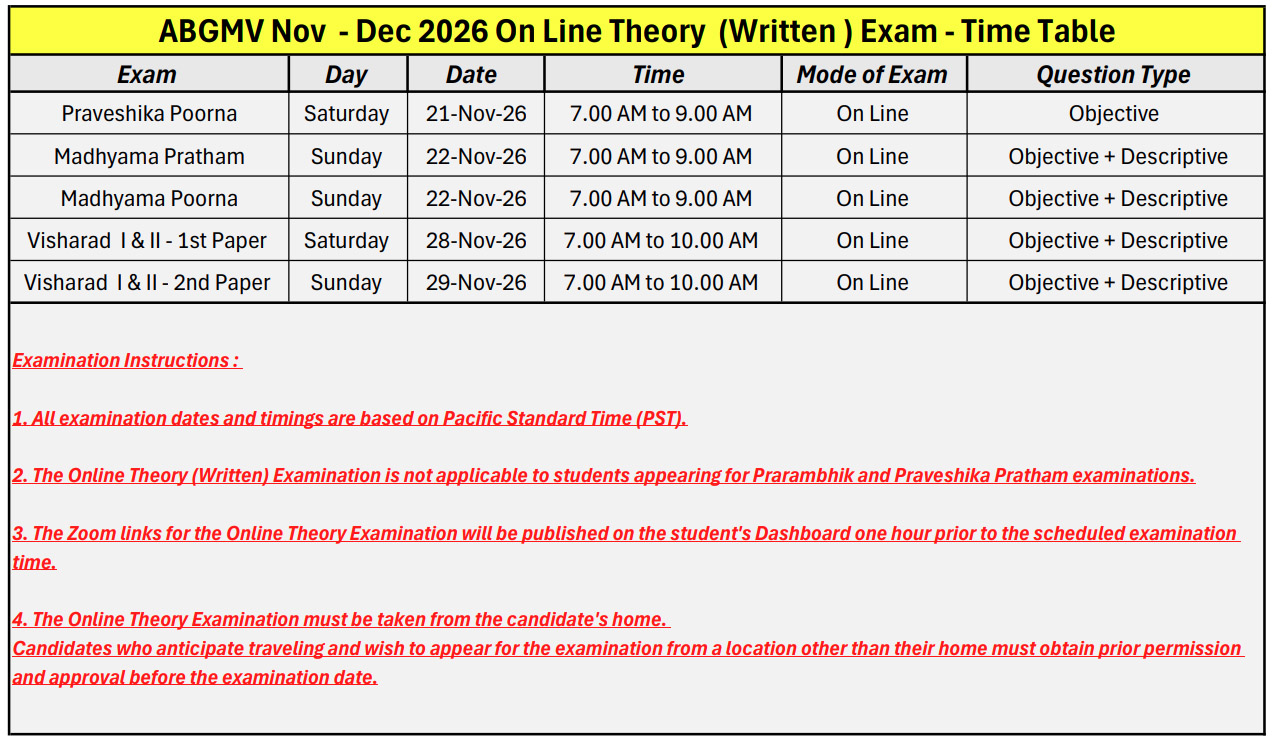
A) Nov – Dec 2026 On Line Written / Theory Exam Time Table
B) Online Theory Exam – Mock Test, Student Dashboard, Important Instructions & Zoom Link
B) Login Links, Imp. Instructions, Student Dashboard Login, Zoom Link
1) Login Links for –
Online Visharad - First Paper theory exam - 28 Nov 2026 - Student zoom link
Time: Saturday Nov 28, 2026 08:00 PM India (as per India Date and Time)
(Students Must login both Links with 2 Separate devices)
Time: Saturday Nov 28, 2026 08:00 PM India (as per India Date and Time)
(Students Must login both Links with 2 Separate devices)
NOTE :
NOTE :
In case dashboard login has any difficulties, please use Online Theory Exam LinkNOTE :
1) Zoom name : Join with your first name and current session roll number, for example “Riya 12345”. Attendance is marked from this name.
2) Camera : Set up your supervision camera exactly as shown in the guidelines.
3) Watermarked Blank Answer-Sheets : Watermarked blank answer-sheets for all Visharad students are now available on individual Student Dashboards. Students must use only these official watermarked answer-sheets during the live exam. Answers written on any other paper (including plain paper, rough paper, or mock test papers) will not be accepted or evaluated.
1) Login Links for –
Saturday, 21 November 2026 - Online Live Theory (Written) Praveshika Poorna Students (All Subjects)
(Students Must login both Links with 2 Separate devices)
(Students Must login both Links with 2 Separate devices)
NOTE :
- 5:30 AM PST: The Live Online Theory Exam link opens on your Student Dashboard.
- 6:30 AM PST sharp: Join the Zoom Observation (Supervision) meeting.
NOTE :
In case dashboard login has any difficulties, please use Online Theory Exam LinkNOTE :
1) ONLINE THEORY MOCK TEST – MANDATORY
1) All Praveshika Poorna, Madhyama and Visharad students MUST take the Mock Test.
2) The Mock Test helps find and fix any technical problems before the Live Exam.
3) Technical problems cannot be solved during the Live Exam, so please take the Mock Test early.
4) Mock Test open: November 1 – November 15, 2026
5) Link closes: Sunday, November 15, 2026 at 4:30 AM PST
Step 1: Click "Student Login with PRN & Password" (Option 1)
Step 2: Enter your PRN (format: GMM-XXX-XXXXX) and your Password
2) STUDENT DASHBOARD LOGIN CONTAINS :
1) Hall Ticket
2) Mock Test Link
3) Important Instructions PDF (in the Notice menu)
4) Blank Answer Sheets (for Madhyama and Visharad students) – Students must download and print Blank answer sheets for Subjective Questions.
3) IMPORTANT INSTRUCTIONS – MUST READ
1) Please read the "Instructions to be followed while appearing for Online Theory Exam" document in your Student Dashboard (Notice menu) before the exam.
2) Students must follow all rules and instructions. Otherwise, we will not consider any complaints afterwards.